How to stop doomscrolling by changing the moment before it starts
Doomscrolling rarely starts with a decision. You open a feed to check one thing, and a long time later you are still there. Trying to stop in the middle of a scroll is hard. This guide is about acting earlier, in the moment before the feed loads.
Find where your loop starts
Every loop has a start. For some people it is a new tab right after sending an email. For others it is the moment a task gets hard, or the first minutes after waking up.
Notice yours for a few days. Which site do you open, and what were you doing right before? You do not need to change anything yet. You only need to know which sites and which moments to work on.
Put a pause in front of the feed
Without anything in the way, the loop is short. You feel the urge, you click, and the feed is there. At no point are you asked to decide.
A pause adds that point. With Focuser, a listed site is covered as soon as it loads, and any video stops. You see one question: do you really need this site? If the answer is no, you close the tab and the loop ends before it begins.
There is research behind this idea. A 2023 study in PNAS tested One Sec, a phone app that shows a short pause with an option to back out before chosen apps open. Over six weeks, participants tried to open those apps less often. In a separate experiment, the option to back out had the strongest effect of the features tested. The study was about a phone app, not about Focuser, and One Sec's founder is one of its authors. The idea is the same, though: give yourself a clear chance to say no.
Without a pause
With Focuser
Give every visit an end
Some visits are real. You want the news, or a short break. The trouble is that feeds keep loading new posts, so a visit has no natural end.
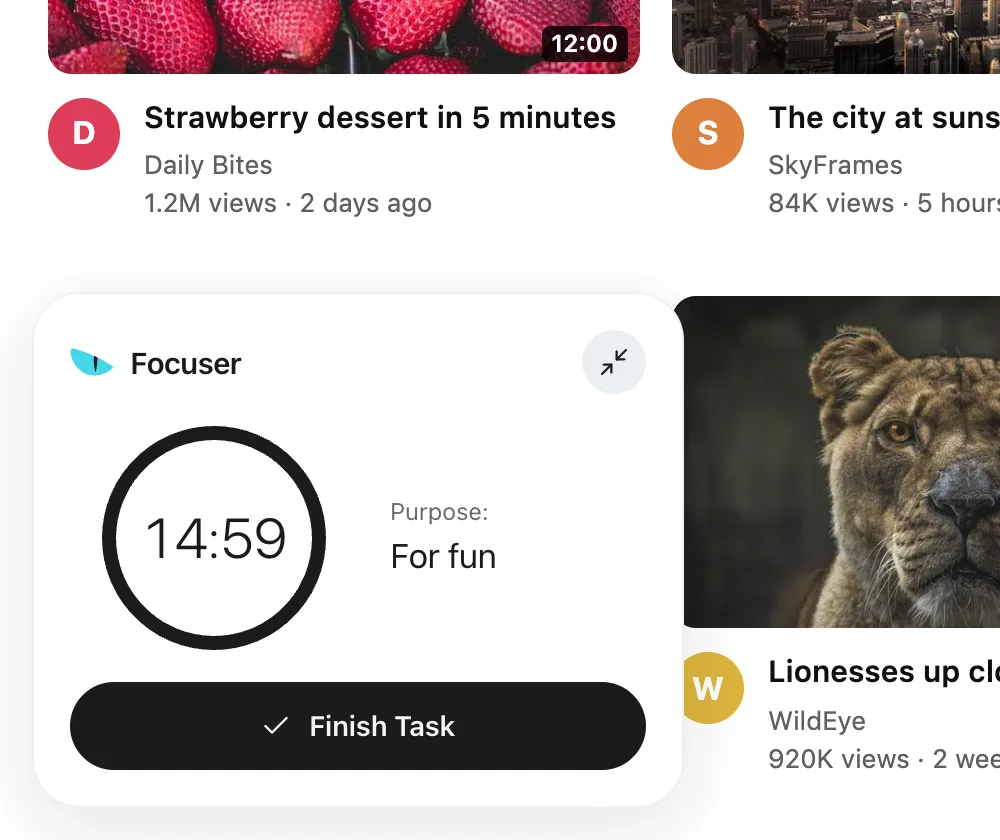
Focuser asks how long you need before you go in. Pick 15 minutes, 45 minutes or 1 hour 30 minutes, or set your own options. A timer in the corner shows your purpose and the time left. When it runs out, the prompt covers the page again and pauses any video. You can stop there, or start a new visit with a new reason.
Pick a short time when you can. If you open a news site for one story, give it a few minutes, not an hour.
Make the hard hours quieter
If your loop has a time of day, such as late at night or the first hour of work, use a schedule. Pick the sites, the days and the hours. Schedules can run overnight, so a schedule from 22:00 to 07:00 works.
If feeds are only a problem at certain hours, put them in a schedule and set the blocking mode to Sessions only. Listed sites that are not in a schedule then open without a prompt.
You do not need a long list. Start with the one feed that costs you the most time, and add others only when you notice them pulling you in.
When you slip
Some days you will continue when you meant to close the tab. That is normal. Look at the reason you gave. If you keep choosing the same vague reason for one site, pick a shorter time on your next visit, or put that site in a schedule. If one time of day keeps catching you, move your schedule to cover it.
Keep the goal small. You are not trying to quit the internet. You are trying to make each visit one that you chose.
Common questions
What is doomscrolling?
It is scrolling through a feed, often full of bad news, long after it stopped being useful. It often starts as a quick check.
Can a website blocker stop doomscrolling?
It can help if it acts before the feed loads. A pause gives you a moment to decide, and a time limit gives the visit an end.
Do I have to give up the news?
No. Decide what you need, give the visit a short time limit, and leave when the timer ends.
Does Focuser work on my phone?
No. Focuser runs in Chrome on desktop computers only.
Read next
Give your next visit a reason
Add Focuser to Chrome and start with two or three sites. It is free, it needs no account, and you can remove it from the toolbar at any time.
Add Focuser to Chrome