A website blocker that asks instead of locking you out
Most website blockers try to keep you out. Focuser asks a question instead. When a site on your list opens, it pauses the page and asks if you really need it. If you do, you give a reason and a time limit, and the site is yours until the timer ends. Here is why that works better than a lock for many people, and when it does not.
Why hard lockouts get bypassed
A strict blocker works well until the day you really need a blocked site. Maybe a teacher shared a video, or someone sent you a message you have to answer. The lock is now in your way, so you turn it off. After a few days like that, switching the blocker off becomes the habit.
A lock treats every visit the same way. It cannot tell a visit you planned from one you made out of habit, so it stops both. You end up working around your own tool.
Focuser starts from a different idea. Most distracting visits are not decisions. They happen before you think about them. So instead of a wall, Focuser puts a decision in front of the site. A reflex visit often has no good answer to the question of why you are there. A real visit does, and it goes through.
How a pause works
You add the sites that pull you in. When one of them loads, Focuser covers the page and asks one question: do you really need this site? Video and audio on the page pause while the question is on screen. That includes embedded YouTube, Vimeo and Twitch players.
If it was a reflex, close the tab, or press Esc. If you need the site, continue, or press Enter. You can also create a schedule for that site from the same screen.

A reason and a time limit for every visit
When you continue, Focuser asks for your purpose. Pick a saved reason such as For fun or For work, create your own, or type a one time reason that is not saved. Then choose how long you need. The defaults are 15 minutes, 45 minutes and 1 hour 30 minutes, and you can set your own options from 1 minute up to 24 hours.
Choosing a reason takes a few seconds. Those seconds are the point. They give you a moment to notice when there is no real reason at all.
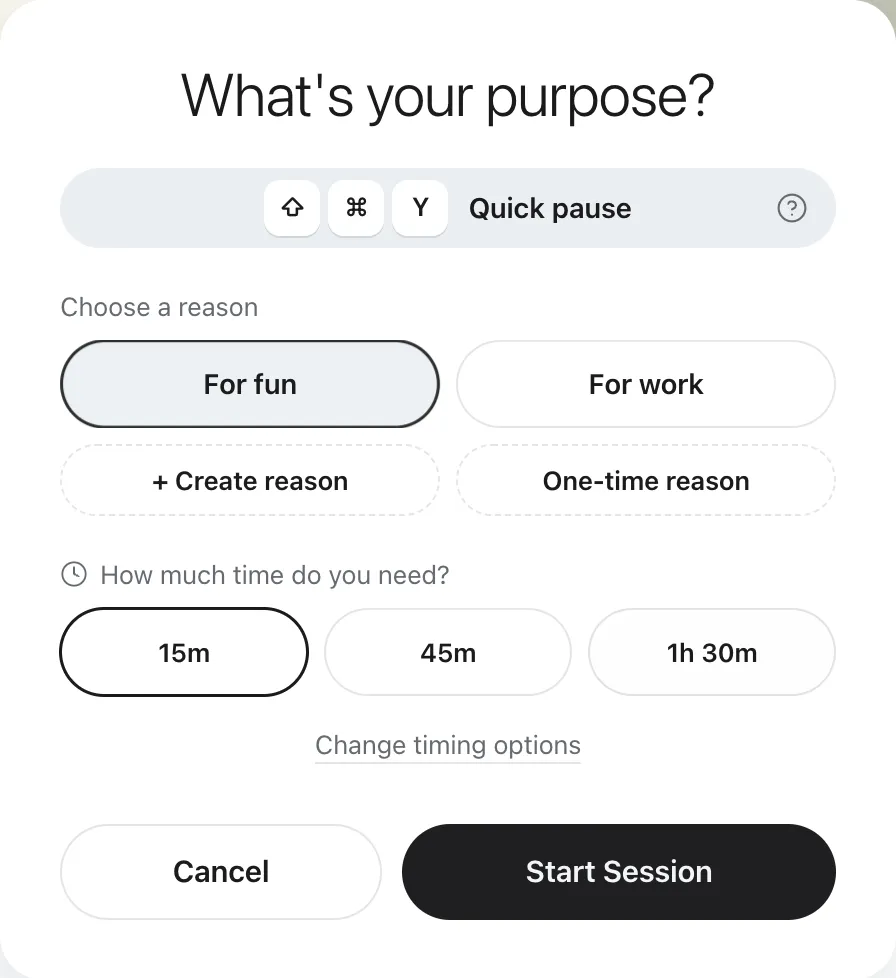
What happens when the time runs out
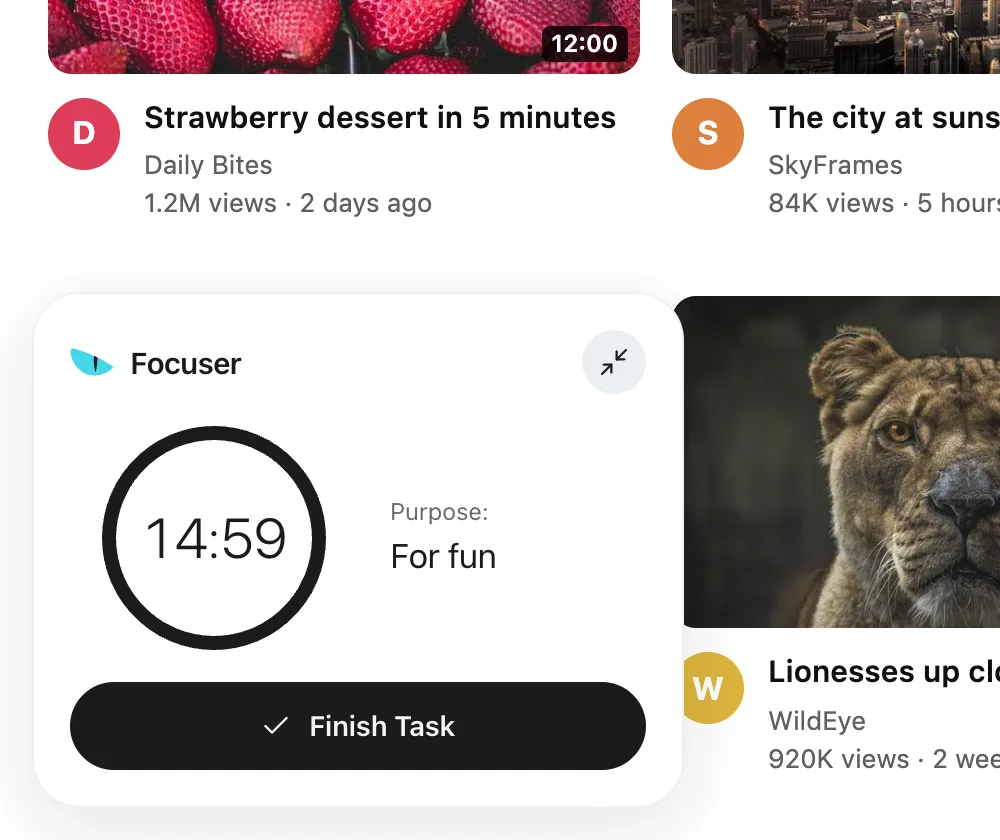
During the visit, a small timer in the bottom left corner shows your purpose and the time left. You can shrink it if it covers something. If you finish early, end the visit from the timer.
When the time is up, the timer disappears and the same prompt covers the page again. Your tab stays open and video pauses again. You can close the tab or start a new visit with a new reason.
Access is per site. All tabs of that site share one timer, so opening a second tab during your visit does not ask you again.
Who it suits, and who it does not
Focuser suits people who need the same sites for work and for fun. You might use YouTube for a tutorial in the morning and for music at night. You keep access, and every visit has a reason and an end.
It is not the right tool if you want a site to be impossible to open. There is no password and no hard block, and you can always continue by giving a reason. If you need a firm wall, a strict blocker with a password lock will suit you better.
- A good fit if you open the same few sites on reflex while you work or study.
- A good fit if you need those sites sometimes and are tired of turning a blocker off.
- Not a good fit if you want a lock that you cannot open yourself.
Common questions
Can I still open a site that is on my list?
Yes, always. Give a reason and a time limit and the site opens. For a very short check, the quick pause gives you 1, 3 or 5 minutes. Press Ctrl+Shift+Y, or Command+Shift+Y on a Mac.
Does Focuser close my tab when the time is up?
No. The prompt covers the page again and pauses any video, but the tab stays open. You decide what happens next.
Is a pause enough to stop me?
It is not meant to stop you. It is meant to make you decide. If you want a site to be impossible to open, a blocker with a password lock is a better fit.
Is Focuser free?
Yes. There is no paid plan and no account to create.
Read next
Give your next visit a reason
Add Focuser to Chrome and start with two or three sites. It is free, it needs no account, and you can remove it from the toolbar at any time.
Add Focuser to Chrome